
FlowVPN 進階 VPN 協議
VPN被屏蔽了? FlowVPN為您提供更多連線方式。
FlowVPN 結合了獨特的 FlowTCP 技術和先進的加密隧道技術,可協助您在普通 VPN 難以連線的網路上安全連線。
已經安裝了應用程式? 請參閱逐步指南
專為複雜網路設計
一個VPN,更多連線方式。
TLS HTTPS
TLS SMTP
SSH VPN
協議可用性因設備和應用程式版本而異。
為什麼選擇 FlowVPN
進階防火牆繞過功能。內建於您的 VPN 中。
FlowVPN 透過三種方式協助您應對受限的網路。
在受限網路上連接
進階加密隧道技術為 FlowVPN 提供了更多在網路阻止傳統 VPN 流量時進行連線的方式。
獨家FlowTCP技術
我們專有的基於 WireGuard 的 TCP 技術為標準 UDP VPN 連線受限的網路提供了一種替代方案。
更多保持聯繫的方式
在支援的環境下,可在 FlowTCP、TLS HTTPS、TLS SMTP 和 SSH VPN 之間切換,並可選擇自訂 TLS 主機名稱設定。
所有標準VPN協定也都支援。
FlowVPN 也支援包括 IPSec、OpenVPN 和 WireGuard 在內的值得信賴的業界標準 VPN 協定。您可以選擇熟悉的協定用於日常使用,或在網路受限時切換到進階的 FlowVPN 隧道功能。
簡易協定切換
如何更改 VPN 協議
無需複雜設定。在 FlowVPN 應用中選擇可用協議,選擇伺服器並連接。請按照您設備的說明進行操作。
安裝說明
視窗
直接從 FlowVPN 主視窗選擇連線協定。
- 適用於 Windows 的 OpenFlowVPN。
- 在主畫面的協定選項中選擇 FlowTCP、TLS HTTPS 或 TLS SMTP。
- 選擇伺服器位置,然後按一下“連線”。
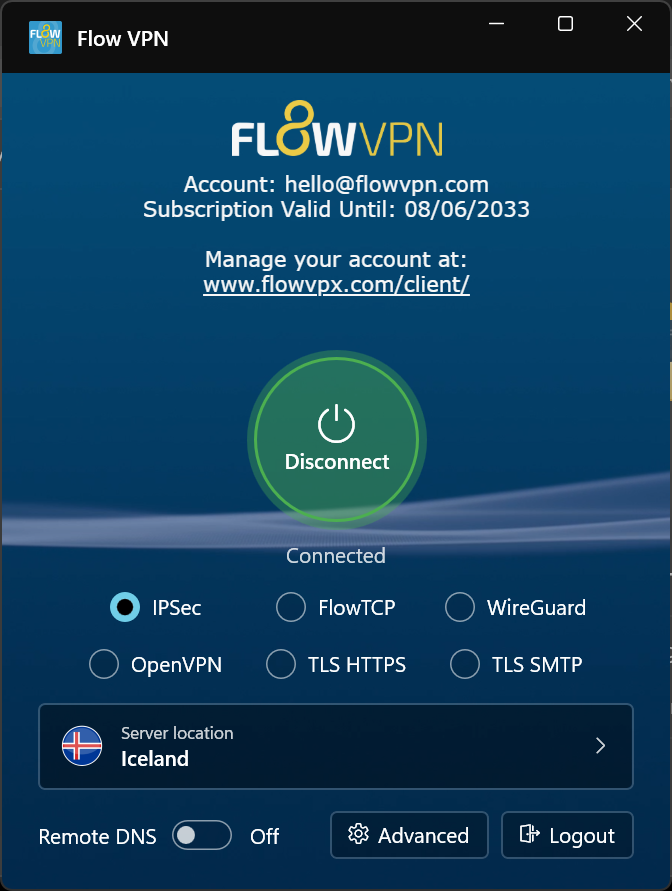
選擇螢幕截圖即可查看完整尺寸。
安裝說明
安卓
開啟協定選擇器,查看可用的連線方式。
- 開啟FlowVPN安卓應用程式。
- 點選目前協定開啟列表,然後選擇 TLS HTTPS、TLS SMTP 或 SSH。
- 選擇伺服器,然後點擊連線。
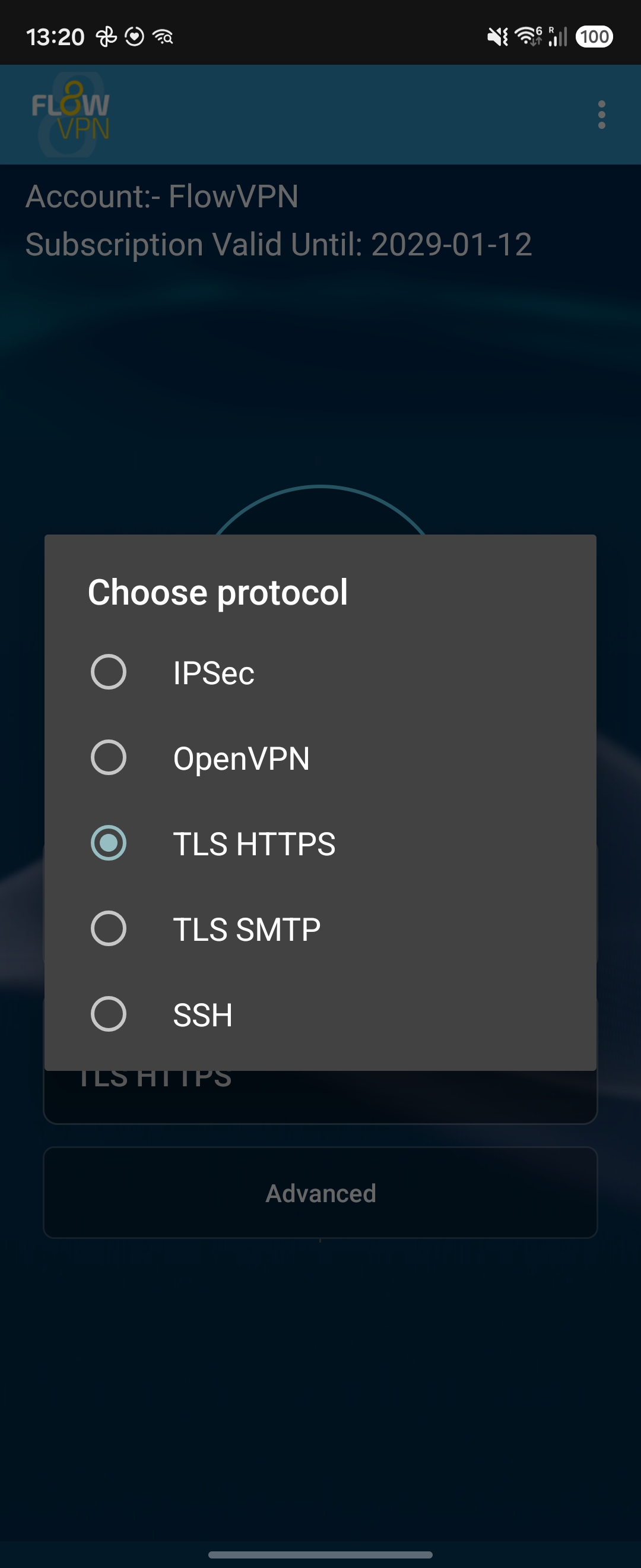
選擇螢幕截圖即可查看完整尺寸。
安裝說明
iPhone 和 iPad
使用「更多」或三點選單開啟完整協定清單。
- 打開 FlowVPN,在螢幕底部附近找到 VPN 協定。
- 點擊協議選項右側的“更多”,或在顯示該選項的應用程式版本中點擊三點選項。
- 從完整清單中選擇所需的協議,然後點擊「連線」。
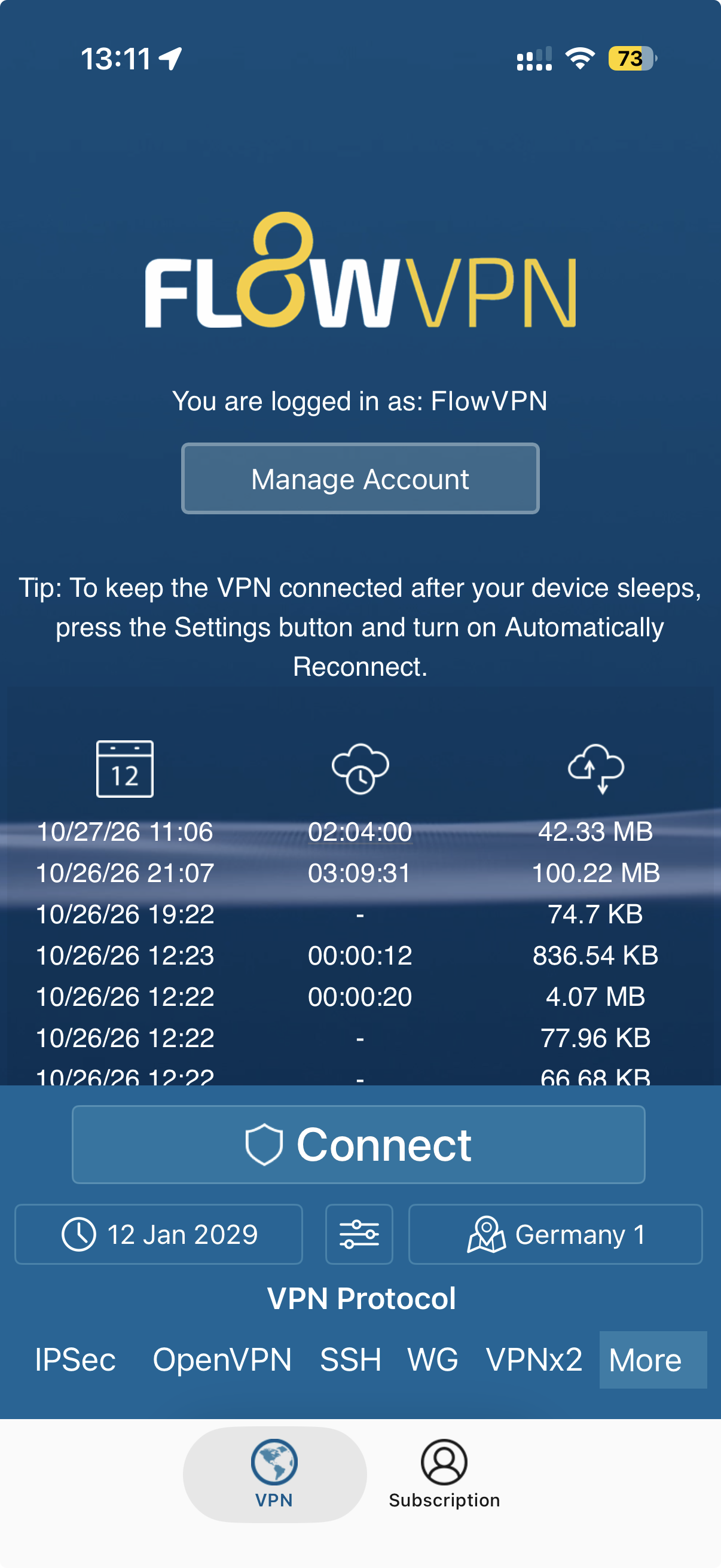
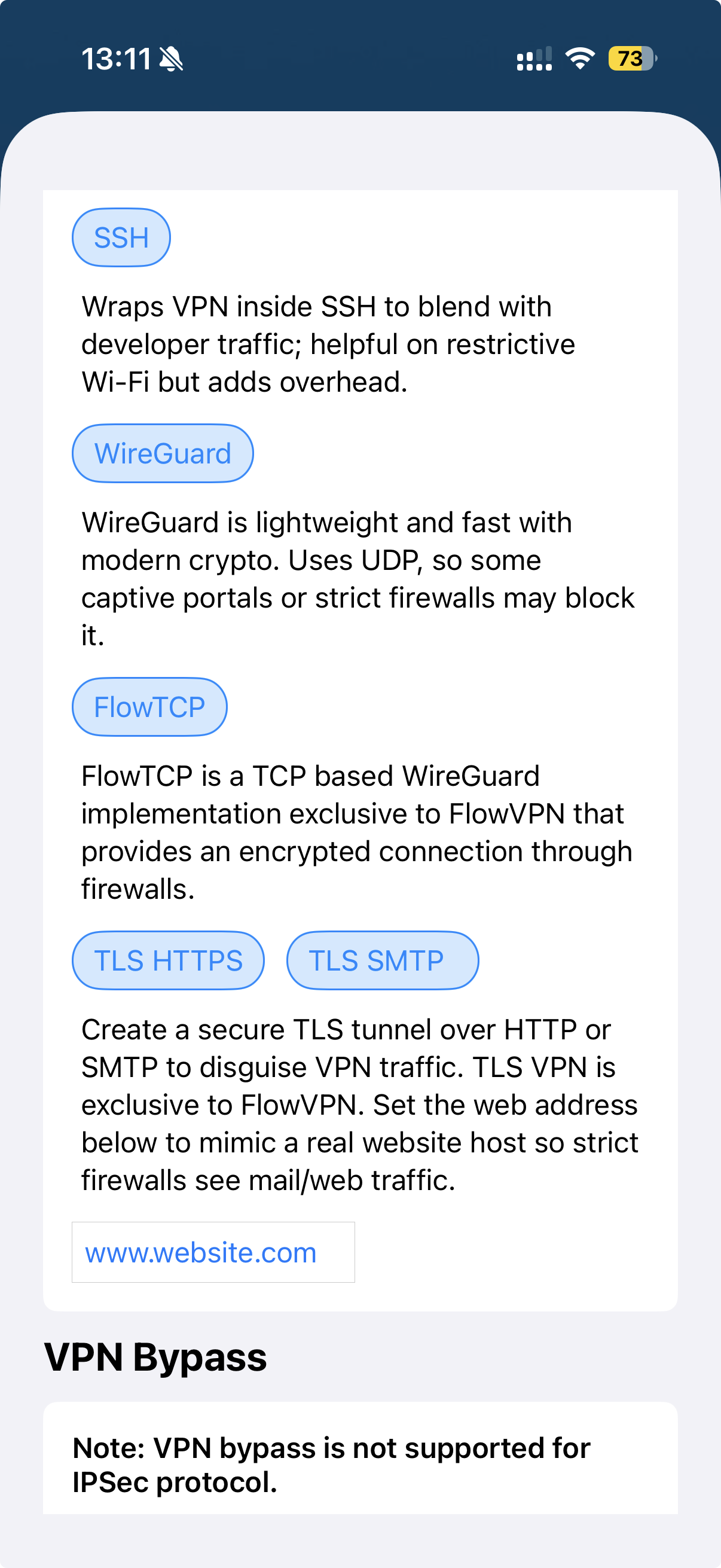
選擇螢幕截圖即可查看完整尺寸。
安裝說明
macOS
透過 Mac 功能表列中的「進階 VPN」選單選擇您的協定。
- 在您的 Mac 上開啟 FlowVPN 主視窗。
- 在功能表列中,開啟進階 VPN,然後選擇 FlowTCP、TLS HTTPS、TLS SMTP 或 SSH VPN。
- 選擇伺服器位置並連接。
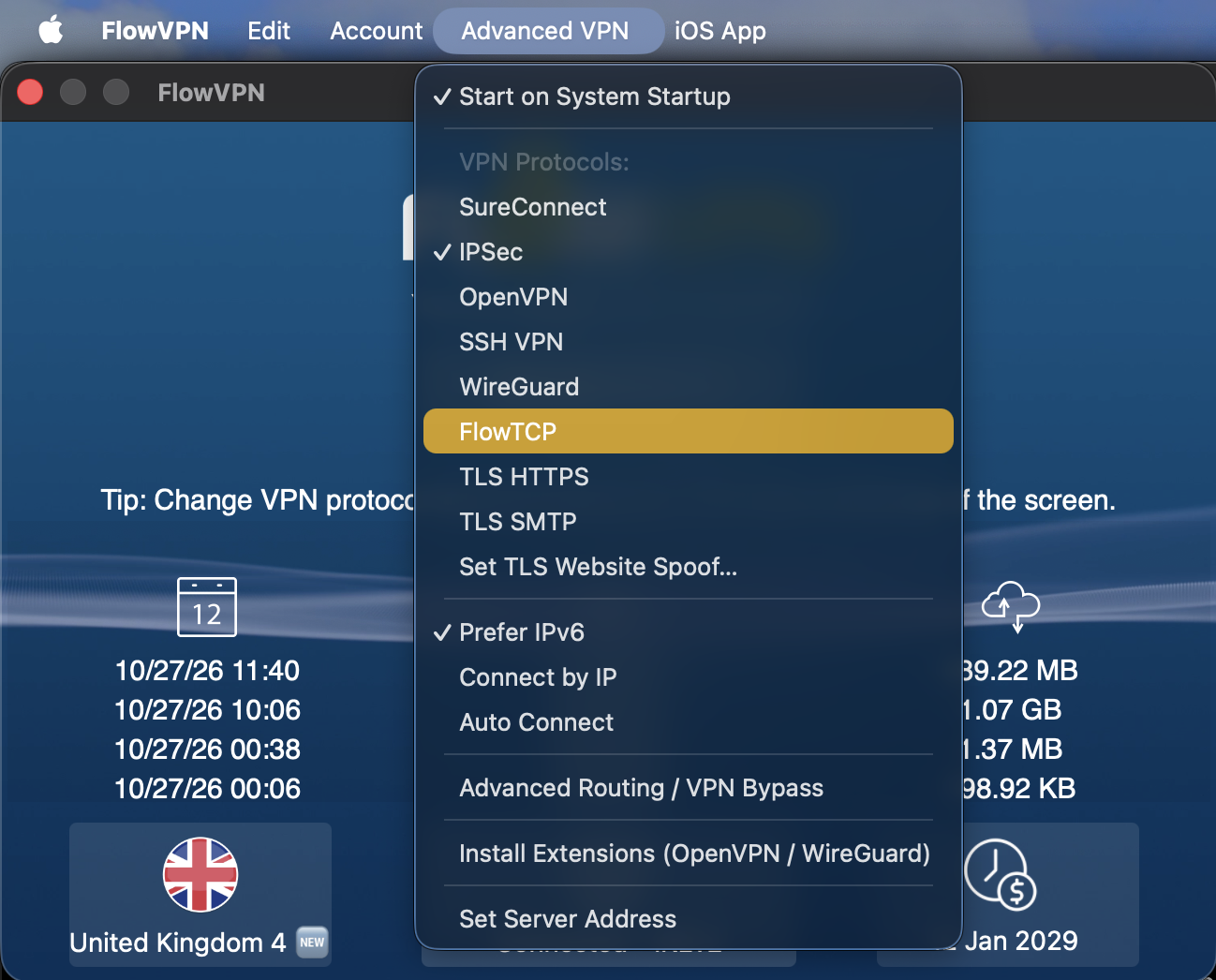
選擇螢幕截圖即可查看完整尺寸。
連結背後
FlowVPN繞過協定的工作原理
FlowVPN 將成熟的 VPN 加密技術與專有技術和多種專為受限網路設計的加密傳輸方法結合。
FlowTCP:基於 WireGuard 的 TCP VPN
FlowTCP 是 FlowVPN 基於 WireGuard 技術的專有 TCP 實作。它為 UDP VPN 流量被封鎖或限制的網路提供了額外的加密連線方式。
TLS HTTPS:安全且對網路友善的傳輸協議
TLS HTTPS 透過 TCP 連接埠 443,在加密的 TLS 傳輸層內承載 VPN 連線。當網路允許 HTTPS 連接但限制可識別的 VPN 協定時,它非常有用。
TLS SMTP:另一個加密連線選項
TLS SMTP offers an additional VPN transport based on TLS connections associated with secure email services. Different network rules can make this useful when another protocol does not connect.
SSH VPN:一種替代隧道
SSH VPN 在加密的 SSH 連線中傳輸 VPN 流量,為限制普通 VPN 連線的網路提供了另一種選擇。
自定义 TLS 主机名和动态证书
對於進階用戶,FlowVPN 支援的 TLS 傳輸允許配置 TLS 主機名稱。 FlowVPN 可以為其隧道基礎設施動態產生和簽署證書,從而在透過受限網路連線時提供更大的靈活性。
問答
VPN協定:常見問題解答
如果我的VPN被防火墙屏蔽了,我该怎么办?
開啟 FlowVPN,嘗試使用 FlowTCP 或 TLS HTTPS(如果應用程式中顯示)。如果連線仍然被阻止,請嘗試其他可用選項,例如 TLS SMTP 或 SSH VPN。連線成功與否取決於網路狀況。
為什麼我看不到 FlowTCP 或更新的 TLS 協定?
These are newer FlowVPN features. Install the latest version of FlowVPN, reopen the app and check the protocol list again. Available options vary by platform and app version.
Does FlowVPN also support standard VPN protocols?
Yes. FlowVPN also supports industry-standard VPN protocols including IPSec, OpenVPN and WireGuard. Use these for everyday connections or try the advanced transports when your network is restrictive.
Are FlowTCP and TLS HTTPS the same thing?
No. FlowTCP is FlowVPN's proprietary WireGuard-based TCP implementation. TLS HTTPS uses an encrypted TLS transport to carry the VPN connection. They provide different options on restrictive networks.
Will these protocols get through every firewall?
No VPN connection method works on every network. FlowVPN offers multiple technologies to try when a conventional connection is blocked.
Do I need to configure a TLS hostname?
Usually not. First select an available protocol and connect. Custom TLS hostname configuration is an optional advanced setting.
When one VPN protocol is blocked, try another.
FlowVPN brings standard VPN security, exclusive FlowTCP and advanced TLS tunnelling together in one service.
Advanced protocol availability varies by device and app version. No VPN can guarantee a connection on every network.